![iconosquare_logo_blue_full_1024px.png]](https://support.iconosquare.com/hs-fs/hubfs/Images/Logos/iconosquare_logo_blue_full_1024px.png?width=150&height=50&name=iconosquare_logo_blue_full_1024px.png)
To remove the Iconosquare business integration, you’ll need to do this directly from your Facebook personal profile (not from a Facebook Page or Business Manager).
-
Step 1: Access Your Facebook Settings
-
Log in to your Facebook personal profile.
-
Click your profile picture in the top-right corner.
-
Select Settings & privacy.
-
Click Settings.
-
-
Step 2: Open Business Integrations
-
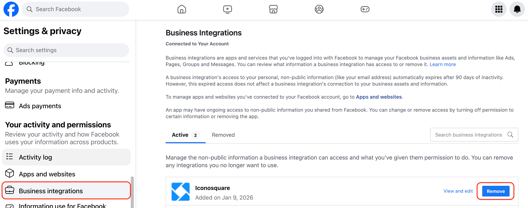
In the left-hand menu, scroll down to Your activity and permissions.
-
Click Business integrations.
-
Locate Iconosquare in the list.
-
Click Remove.
-
-
Step 3: Confirm the Removal
-
This confirmation pop-up will appear:
-
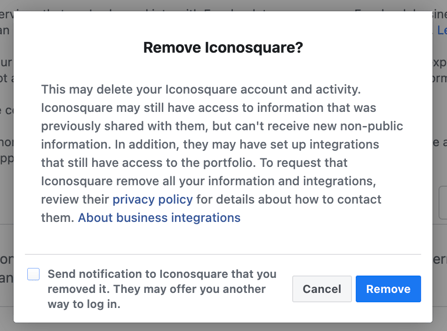
This is a generic Facebook warning.Removing the business integration will NOT delete your Iconosquare account. It only disconnects your Facebook personal profile from Iconosquare.
-
-
Click Remove to confirm and the integration will be successfully disconnected.
-
What Happens Next?
-
The connection between Facebook and Iconosquare will be removed.
-
You can reconnect your Facebook profile to Iconosquare at any time directly your Iconosquare account settings.