---
title: How can I create a dashboard?
description: You can quickly and easily create a dashboard based on the metrics most important to you. This is available for all social profiles, for all users an all plans. Check out this article to learn more
---
[Skip to content](https://support.iconosquare.com/how-can-i-create-a-dashboard#main-content)
- [English](https://support.iconosquare.com/how-can-i-create-a-dashboard)
- [Français](https://support.iconosquare.com/fr/comment-creer-un-tableau-de-bord)
English
Show submenu for translations
![iconosquare\_logo\_blue\_full\_1024px.png\]](https://support.iconosquare.com/hs-fs/hubfs/Images/Logos/iconosquare_logo_blue_full_1024px.png?width=150&height=50&name=iconosquare_logo_blue_full_1024px.png)
Open main navigation
Close main navigation
- - [English](https://support.iconosquare.com/how-can-i-create-a-dashboard)
- [Français](https://support.iconosquare.com/fr/comment-creer-un-tableau-de-bord)
English
Show submenu for translations
- [Visit website](https://www.iconosquare.com/)
[Visit website](https://www.iconosquare.com/)
How can we help you?
- There are no suggestions because the search field is empty.
1. [Knowledge base](https://support.iconosquare.com/?hsLang=en)
2. [Iconosquare Features](https://support.iconosquare.com/iconosquare-features?hsLang=en)
3. [Dashboards](https://support.iconosquare.com/iconosquare-features?hsLang=en#dashboards)
# How can I create a dashboard?
You can quickly and easily create a dashboard based on the metrics most important to you. This is available for **all social profiles**, for all users an all plans. Check out this article to learn more about this feature!
In this article :
- [How do I build my dashboard?](https://support.iconosquare.com/how-can-i-create-a-dashboard#mcetoc_1e0spb4pl38)
- [Can I export my dashboard?](https://support.iconosquare.com/how-can-i-create-a-dashboard#mcetoc_1e0spb4pl39)
- [Is the dashboard shared between Iconosquare team members?](https://support.iconosquare.com/how-can-i-create-a-dashboard#mcetoc_1e0spb4pl3a)
- [How can I duplicate my dashboard and share it with a team member?](https://support.iconosquare.com/how-can-i-create-a-dashboard#mcetoc_1e9aqtk9g1)
- [How can I remove a widget from my dashboard?](https://support.iconosquare.com/how-can-i-create-a-dashboard#mcetoc_1e0spb4pl3b)
**How do I build my dashboard?**
- Click on the Dashboard icon on the main menu.
- Click on **Create new dashboard**.
- Choose the social profile you would like to include on your newly created dashboard. Guess what? You can have a multi-profile dashboard 🙌.
- Drag and drop the widgets into the custom dashboard - you’ll find them listed within the relevant section on the right-hand side of your screen - just click on the arrow next to each heading to view the drop-down menu under each section.
- Move the widgets around once they're in the dashboard (by dragging and dropping) so that they're displayed in your preferred order.
- When you're happy with the graphs/KPIs you have added, just click on the blue **Save** button at the bottom of the screen. It’s as easy as that!
**Can I export my dashboard?**
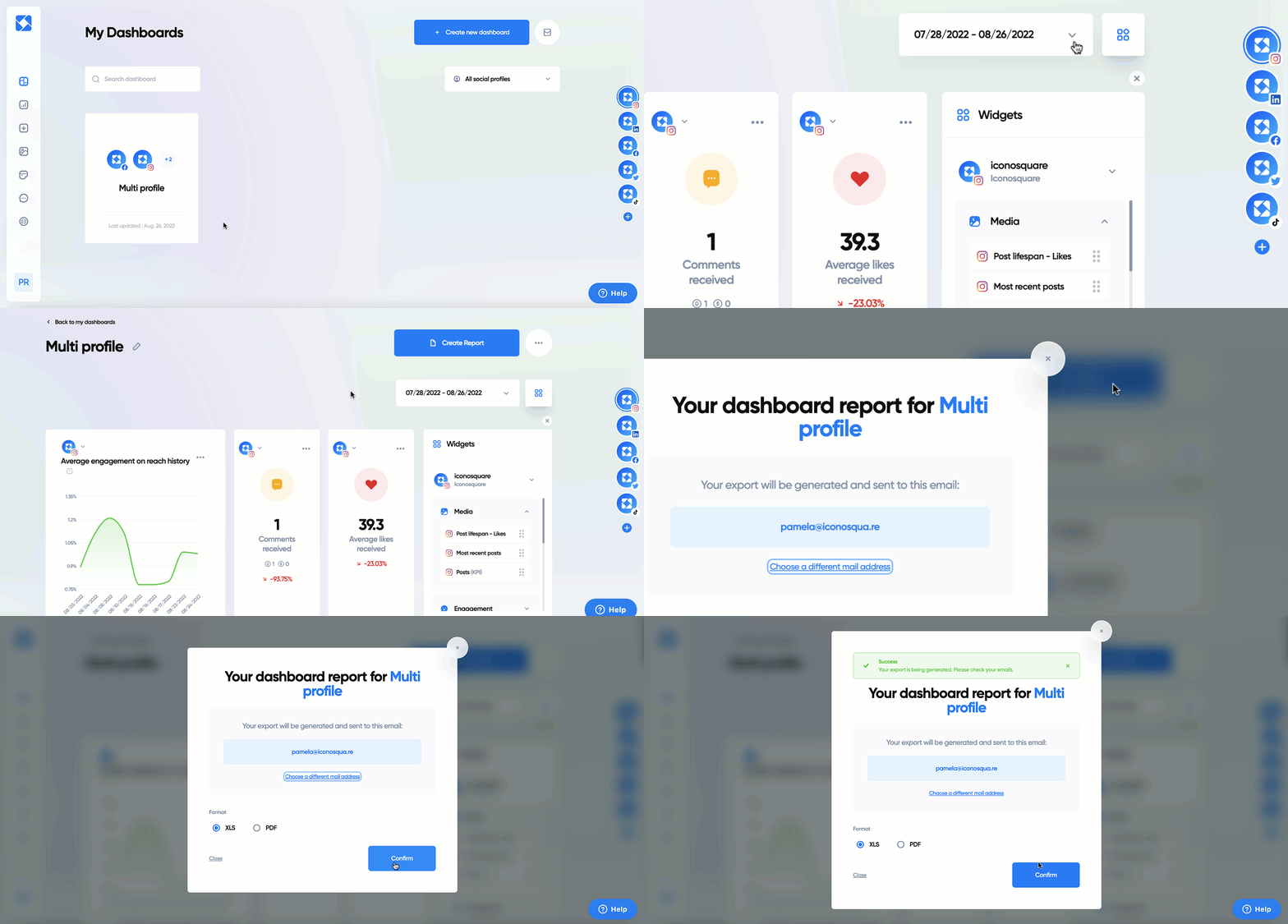
Yes, you can! Just open your dashboard, select the date range, and then click on **Create report**.
****
**Is the dashboard shared between Iconosquare team members?**
The dashboard is independent to each user account, meaning you don’t have to share the dashboard with your other team members anymore. Any changes you make from now on will affect only your dashboard.
You can share the dashboard manually with those team members who have access to the social profile.
**How can I duplicate my dashboard and share it with a team member?**
You can either duplicate and share from the dashboard overview or by opening your dashboard. If you are on the overview, you can hover over the dashboard you wish to duplicate and share and then click on **Duplicate** or **Share dashboard**. If you are in the dashboard you wish to duplicate or share, you can click on the three dots at the top-right corner followed by **Duplicate** or **Share dashboard**.
**How can I remove a widget from my dashboard?**
If you wish to remove one of the widgets you have added, just click on the three dots over the widget followed by **Remove widget**.
Check out our video below on all things dashboards:
- [Setting up your account](https://support.iconosquare.com/setting-up-your-account?hsLang=en#main-content)
- [Adding social profiles](https://support.iconosquare.com/setting-up-your-account?hsLang=en#adding-social-profiles)
- [Feature Set Up](https://support.iconosquare.com/setting-up-your-account?hsLang=en#feature-set-up)
- [Most Frequently Asked Questions](https://support.iconosquare.com/most-frequently-asked-questions?hsLang=en#main-content)
- [Account Settings](https://support.iconosquare.com/most-frequently-asked-questions?hsLang=en#account-settings)
- [Adding Social Profiles](https://support.iconosquare.com/most-frequently-asked-questions?hsLang=en#adding-social-profiles)
- [Analytics](https://support.iconosquare.com/most-frequently-asked-questions?hsLang=en#analytics)
- [Billing](https://support.iconosquare.com/most-frequently-asked-questions?hsLang=en#billing)
- [Most Frequently Asked Questions](https://support.iconosquare.com/most-frequently-asked-questions?hsLang=en#most-frequently-asked-questions)
- [Referall Program](https://support.iconosquare.com/most-frequently-asked-questions?hsLang=en#referall-program)
- [Social Profile Data](https://support.iconosquare.com/social-profile-data?hsLang=en#main-content)
- [Instagram Analytics](https://support.iconosquare.com/social-profile-data?hsLang=en#instagram-analytics)
- [Facebook Analytics](https://support.iconosquare.com/social-profile-data?hsLang=en#facebook-analytics)
- [Twitter Analytics](https://support.iconosquare.com/social-profile-data?hsLang=en#twitter-analytics)
- [TikTok Analytics](https://support.iconosquare.com/social-profile-data?hsLang=en#tiktok-analytics)
- [LinkedIn Analytics](https://support.iconosquare.com/social-profile-data?hsLang=en#linkedin-analytics)
- [Stories](https://support.iconosquare.com/social-profile-data?hsLang=en#stories)
- [Pinterest Analytics](https://support.iconosquare.com/social-profile-data?hsLang=en#pinterest-analytics)
- [Iconosquare Features](https://support.iconosquare.com/iconosquare-features?hsLang=en#main-content)
- [Dashboards](https://support.iconosquare.com/iconosquare-features?hsLang=en#dashboards)
- [Exports and Reports](https://support.iconosquare.com/iconosquare-features?hsLang=en#exports-and-reports)
- [Campaigns](https://support.iconosquare.com/iconosquare-features?hsLang=en#campaigns)
- [Publishing](https://support.iconosquare.com/iconosquare-features?hsLang=en#publishing)
- [Conversations](https://support.iconosquare.com/iconosquare-features?hsLang=en#conversations)
- [Media Library](https://support.iconosquare.com/iconosquare-features?hsLang=en#media-library)
- [Listening](https://support.iconosquare.com/iconosquare-features?hsLang=en#listening)
- [Analytics](https://support.iconosquare.com/iconosquare-features?hsLang=en#analytics)
- [Content](https://support.iconosquare.com/iconosquare-features?hsLang=en#content)
- [Zapier](https://support.iconosquare.com/iconosquare-features?hsLang=en#zapier)
- [Groups](https://support.iconosquare.com/iconosquare-features?hsLang=en#groups)
- [Calculations](https://support.iconosquare.com/calculations?hsLang=en#main-content)
- [All Calculations](https://support.iconosquare.com/calculations?hsLang=en#all-calculations)
- [Iconosquare Account Information](https://support.iconosquare.com/iconosquare-account-information?hsLang=en#main-content)
- [Account Management](https://support.iconosquare.com/iconosquare-account-information?hsLang=en#account-management)
- [Subscription and Plan Information](https://support.iconosquare.com/iconosquare-account-information?hsLang=en#subscription-and-plan-information)
- [Trial Information](https://support.iconosquare.com/iconosquare-account-information?hsLang=en#trial-information)
- [Settings & Platform Options](https://support.iconosquare.com/iconosquare-account-information?hsLang=en#settings-platform-options)
- [Login Information](https://support.iconosquare.com/iconosquare-account-information?hsLang=en#login-information)
- [Permissions](https://support.iconosquare.com/iconosquare-account-information?hsLang=en#permissions)
- [Troubleshooting and Errors](https://support.iconosquare.com/troubleshooting-and-errors?hsLang=en#main-content)
- [Troubleshooting](https://support.iconosquare.com/troubleshooting-and-errors?hsLang=en#troubleshooting)
- [Apps and Free tools](https://support.iconosquare.com/apps-and-free-tools?hsLang=en#main-content)
- [Instagram Audit](https://support.iconosquare.com/apps-and-free-tools?hsLang=en#instagram-audit)
- [Resources](https://support.iconosquare.com/apps-and-free-tools?hsLang=en#resources)
- [Apps for iOS and Android](https://support.iconosquare.com/apps-and-free-tools?hsLang=en#apps-for-ios-and-android)
- [Product Changes](https://support.iconosquare.com/product-changes?hsLang=en#main-content)
- [Product Updates](https://support.iconosquare.com/product-changes?hsLang=en#product-updates)
[](http://www.iconosquare.com)
Copyright © 2025, Iconosquare